Google Titan Security Key on Linux

When trying to use these new fangled things on Debian (Stretch) I needed to edit/create /etc/udev/rules.d/titan.rules and put in it something like the following – else nothing happens when you try using them …

KERNEL=="hidraw", SUBSYSTEM=="hidraw", ATTRS{idVendor}=="096e", ATTRS{idProduct}=="0858", TAG+="uaccess", GROUP="plugdev", MODE="0660"
KERNEL=="hidraw", SUBSYSTEM=="hidraw", ATTRS{idVendor}=="096e", ATTRS{idProduct}=="085b", TAG+="uaccess", GROUP="plugdev", MODE="0660"

This is based on e.g. the ‘dmesg’ output looking something like this for the bluetooth/usb variant :

usb 1-2: new full-speed USB device number 46 using xhci_hcd
usb 1-2: New USB device found, idVendor=096e, idProduct=085b, bcdDevice=35.02
usb 1-2: New USB device strings: Mfr=1, Product=2, SerialNumber=0
usb 1-2: Product: ePass FIDO
usb 1-2: Manufacturer: FS

and this for the plain USB YubiKey like one :

usb 1-1: new full-speed USB device number 47 using xhci_hcd
usb 1-1: New USB device found, idVendor=096e, idProduct=0858, bcdDevice=46.00
usb 1-1: New USB device strings: Mfr=1, Product=2, SerialNumber=0
usb 1-1: Product: U2F
usb 1-1: Manufacturer: FT
hid-generic 0003:096E:0858.0014: hiddev3,hidraw4: USB HID v1.00 Device [FT U2F] on usb-0000:00:14.0-1/input0 

Alternatively, you can just download a udev config file from https://raw.githubusercontent.com/Yubico/libu2f-host/master/70-u2f.rules and stick it in /dev/udev/rules.d and run ‘udevadm control –reload

john the ripper on crypt passwords out of postfixadmin

This might help my future self :

SELECT username, password into outfile '/tmp/passwords.txt' fields terminated by ':' optionally enclosed by '' lines terminated by '\n' from mailbox where mailbox.active = 1;

and then :

john /tmp/passwords.txt ….

e.g.

root@mail:~# john /tmp/passwords.txt 
Created directory: /root/.john
Loaded 2327 password hashes with 2326 different salts (md5crypt [MD5 32/64 X2])
Press 'q' or Ctrl-C to abort, almost any other key for status
(vulnerablePassword) whoopsy@example.com


spam (policyd-weight + excommunicado)

1. See http://github.com/palepurple/policyd-weight – I’m trying to make some changes to policyd-weight (something I’ve been using for ages) to make it more configurable and add in a GeoIP patch which I’ve seen floating around.

2. See https://twitter.com/excommunicado and http://blog.hinterlands.org/2013/11/an-update-on-communicado/ – for a DNS Blacklist you might want to use –  using excommunicado.co.uk as a RHSBL has stopped about 700 spammy emails for me already 🙂

3. See https://github.com/palepurple/policyd-dnsbl-spf-geoip – which should improve on policyd-weight which gave me problems with it’s helo checking etc. It’s easier to configure and hopefully far easier to read the sourcecode  (still perl though ! ).

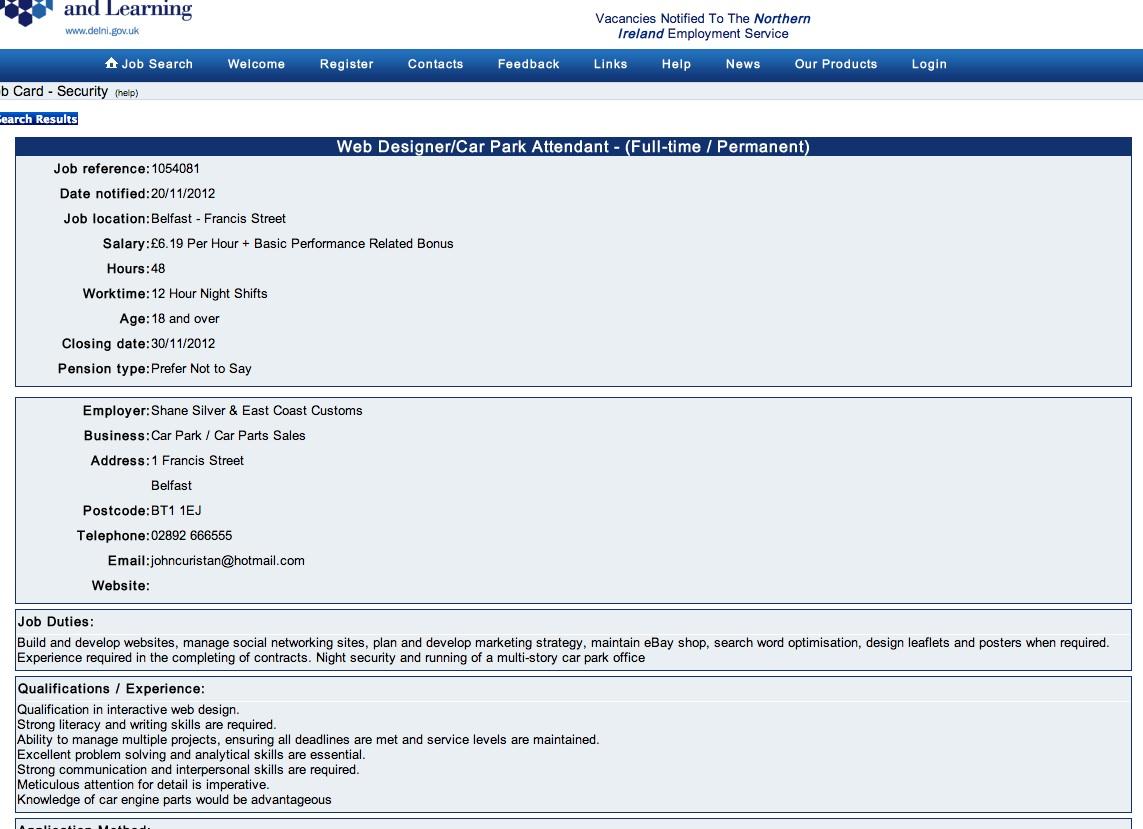
Wanted: Developer with interesting skills…. oh, and it’s for the minimum wage… (Is this a joke?)

Recently on the Twitter the following (attached) image came up – presumably legit, of a job advert. Highlights below. It’s almost like someone cut and pasted two job postings together. The phone number does appear to be legit … so perhaps the advert itself is?

Continue reading “Wanted: Developer with interesting skills…. oh, and it’s for the minimum wage… (Is this a joke?)”

Weird Akismet behaviour with WordPress (incorrect spam identification)

One of my customers uses Akismet to protect his various blogs from the masses of spam.

Oddly torwards the end of last week, Akismet started to identify everything as spam, with no error message being returned on check of spam, and the admin dashboard showing the api key/akismet were happy.

I initially thought that perhaps Akismet was just having a bad day, and the problem would go away in a few hours/days time – but this hasn’t been the case. So today, I added in a WordPress plugin to debug the HTTP calls to Akismet to see if that would help identify the problem.


add_action( 'http_api_debug', '_custom_http_api_debug', 10, 5 );

function _custom_http_api_debug( $response, $type, $class, $args, $url ) {    
    error_log( 'Request URL: ' . var_export( $url, true ) );
    error_log( 'Request Args: ' . var_export( $args, true ) );
    error_log( 'Request Response : ' . var_export( $response, true ) );
}


i.e. for a message which was known to be spam :

However, what gave me an idea that something was amiss is that if an administrator attempted to mark an incorrectly tagged comment as ham, the following was seen –

  • Post to http://xxxxx.rest.akismet.com/1.1/submit-ham
  • Response body of ‘Invalid Key’
Normally when submitting ham to the above URL you’d see a response like :
However wordpress was not displaying an error message to the administrator.
Changing the Akismet API keys involved on the sites appeared to fix the problem(s).


Stupid NFS (Debian Squeeze / Ubuntu Precise)

NFS really can be a major PITA. Our office network has been breaking all day.

This seemed to coincide with moving more of our computers to gigabit ethernet (removing the 100mbit CISCO 7960 phones which their network had been daisy-chained through – and seemed to cause intermittent packet loss)

Here are some tips for others unfortunate enough to use it with Debian Squeeze or Ubuntu Precise (12.04 LTS).

  1. On Ubuntu NFS clients, you’ll probably want to use proto=tcp and specify a clientaddr=in the mount options (see the below fstab example). This is especially true if you’ve not got entries for the clients within your local DNS server. If you see ‘clientaddr=0.0.0.0’ and DNS resolution for your clients isn’t working, NFS will not work.
  2. Don’t try using the nfs-kernel-server from squeeze-backports – as for some reason this causes portmap to be uninstalled, which (in my case) stops NIS from working.
  3. Ensure you increase the number of NFS server processes – see /etc/default/nfs-kernel-server (on the server node).
orange:/home /home nfs4 defaults,noatime,proto=tcp,clientaddr=172.30.33.250 0 0