Netbeans vs Vim … round 1 … fight

So, I think I’ve changed ‘editor’. Perhaps this is a bit like an engineer changing their calculator or something.

For the last 10 years, I’ve effectively only used ‘vim‘ for development of any PHP code I work on.

I felt I was best served using something like vim – where the interface was uncluttered, everything was a keypress away and I could literally fill my entire monitor with code. This was great if my day consisted of writing new code.

Unfortunately, this has rarely been the case for the last few years. I’ve increasingly found myself dipping in and out of projects – or needing to navigate through a complex set of dependencies to find methods/definitions/functions – thanks to  the likes of PSR0. Suffice to say, Vim doesn’t really help me do this.

Perhaps, I’ve finally learnt that ‘raw’ typing speed is not the only measure of productivity – navigation through the codebase, viewing inline documentation or having a debugger at my fingertips is also important.

So, last week, while working on one project, I eventually got fed up of juggling between terminals and fighting with tab completion that I re-installed netbeans – so, while I’m sure vim can probably do anything netbeans can – if you have the right plugin installed and super flexible fingers.

So, what have I gained/lost :

  • a 10 second slow down – that’s how long it takes to start Netbeans – even with an SSD and a desktop that should be quick enough (perhaps this is justification for a faster desktop?). Lesson learnt – do not close Netbeans.
  • indexing of the code – although this takes some time when importing an existing project – it does make it very quick to ‘find uses’ of function/class X
  • the ability to easily jump to a function/class definition (right click, find uses …)
  • a list of ‘todo’ items – from my code comments … this has led to me removing some old legacy cruft…
  • the ‘refactor’ functionality – i.e. rename function old_name() and change all instances of it to new_name()
  • code indentation seems to work better under netbeans
  • inline ‘warnings’ (i.e. unused variable, previously undefined variable[x], syntax errors etc) – so I don’t have to wait for them to appear in a browser or elsewhere.
  • inline documentation etc while typing (i.e. type in in_array( and it reminds me where the needle and haystack are)
  • with the right them, a nicer editor Window (mine is based on BrandonDark)

x – Fails with global variables on legacy projects though – in that netbeans doesn’t realise the variable has been sucked in through a earlier ‘require’ call.

I did briefly look at sublime a few weeks ago, but couldn’t see what the fuss was about – it didn’t seem to do very much – apart from have multiple tabs open for the various files I was editing.

SQL Injection with added magic_quotes assistance (the joys of legacy code maintenance)


Sometimes you really have to laugh (or shoot yourself) when you come across legacy code / the mess some other developer(s) left behind. (Names slightly changed to protect the innocent)

class RocketShip {

    function rahrah() {
        $sql = "insert into foo (rah,rahrah,...) 
            values ( '" . $this->escape_str($this->meh) . "', ...... )";
        mysqli_query($this->db_link, $sql) or 
            die("ERROR: " . mysqli_error($this->db_link));
        $this->id = mysqli_insert_id($this->db_link);
    }

    function escape_str($str)
    {
        if(get_magic_quotes_gpc())
           { $str = stripslashes($str);}
        //echo $str;
        //$clean = mysqli_real_escape_string($this->db_link,$str);
        //echo $clean;
       return $str;
    }
// ....
    function something_else() {
         mysqli_query($this->db_link, 
            sprintf("insert into fish(field1,field2) values('%s', '%s')", 
            $this->escape_str($this->field1), 
            $this->escape_str($this->field2));

    }
}

You’ve got to just love the :

  1. Lack of Error handling / logging.
  2. Functionality of the escape_str function which is only making matters worse (and could never have worked due to the variable names)
  3. Use of sprintf  and %s ….(obviously %d could be useful)
  4. Documentation?

Dare I uncomment the mysqi_real_escape_string and fix escape_str’s behaviour?

In other news, see this tweet – 84% of web apps are insecure; that’s a bit damning. But perhaps not surprising given code has a far longer lifespan than you expect….


Zend_Cache – automatic cache cleaning can be bad, mmkay?

$customer uses Zend_Cache in their codebase – and I noticed that every so often a page request would take ~5 seeconds (for no apparent reason), while normally they take < 1 second …

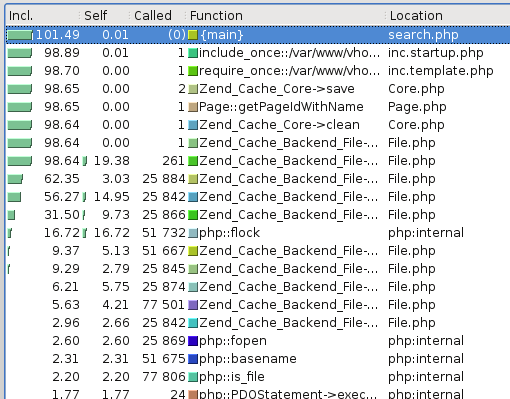
Some rummaging and profiling with xdebug showed that some requests looked like :

xdebug profiling output - note lots of zend_cache stuff

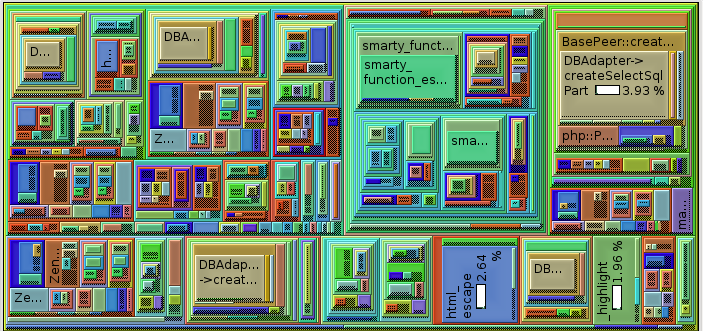
Note how there are 25,000 or so calls for various Zend_Cache_Backend_File thingys (fetch meta data, load contents, flock etc etc).

This alternative rendering might make it more clear – especially when compared with the image afterwards :

zend cache dominating the call map

while a normal request should look more like :

a "normal" request - note Zend_Cache is not dominating

Zend_Cache has a ‘automatic_cleaning_mode’ frontend parameter – which is by default set to 10 (i.e. 10% of all write requests to the cache result in it checking if there is anything to garbage collect/clean). Since we’re nearly always writing something to the cache, this results in 10% of requests triggering the cleaning logic.

See http://framework.zend.com/manual/en/zend.cache.frontends.html.


The cleaning is now run via a cron job something like :

$cache_instance->clean(Zend_Cache::CLEANING_MODE_OLD);


PHP Serialization & igbinary

Recently I’ve been trying to cache more and more stuff – mostly to speed things up. All was well, while I was storing relatively small numbers of data – because (as you’ll see below) my approach was a little flawed.

Random background – I use Zend_Cache, in a sort of wrapped up local ‘Cache’ object, because I’m lazy. This uses Zend_Cache_Backend_File for storage of data, and makes sure e.g. different sites (dev/demo/live) have their own unique storage location – and also that nothing goes wrong if e.g. a maintenance script is run by a different user account.

My naive approach was to do e.g.

$cached_data = $cache->load('lots_of_stuff');
if(!empty($cached_data)) {
   if(isset($cached_data[$key])) {
       return $value;
   }
}
else {
    // calculate $value
    $cached_data[$key] = $value;
    $cache->save($cached_data, $cache_key);
}
return $value;

The big problem with this is that the $cached_data array tends to grow quite large; and PHP spends too long unserializing/serializing. The easy solution for that is to use more than one cache key. Problem mostly solved.

However, if the site is performing a few thousand calculations, speed of [de]serialisation is still gong to be an issue – even if the data involved is in small packets. I’d already profiled the code with xdebug/kcachegrind and could see PHP was spending a significant amount of time performing serialisation – and then remembered a presentation I’d seen (http://ilia.ws/files/zendcon_2010_hidden_features.pdf – see slides 14/15/16 I think) at PHPBarcelona covering Igbinary (https://github.com/phadej/igbinary)

Once you install the extension –

phpize
./configure
make
cp igbinary.so /usr/lib/somewhere
#add .ini file to /etc/php5/conf.d/

You’ll have access to igbinary_serialize() and igbinary_unserialize() (I think ‘make install’ failed for me, hence the manual cp etc).

I did a random performance test based on this and it seems to be somewhat quicker than other options (json_encode/serialize) – this was using PHP 5.3.5 on a 64bit platform. Each approach used the same data structure (a somewhat nested array); the important things to realise are that igbinary is quickest and uses less disk space.

JSON (json_encode/json_decode):

  • JSON encoded in 2.18 seconds
  • JSON decoded in 9.83 seconds
  • serialized “String” size : 13993

Native PHP :

  • PHP serialized in 2.91 seconds
  • PHP unserialized in 6.43 seconds
  • serialized “String” size : 20769

Igbinary :

  • WIN igbinary serialized in 1.60 seconds
  • WIN igbinrary unserialized in 4.77 seconds
  • WIN serialized “String” Size : 4467

The performance testing bit is related to this Stackoverflow comment I made on what seemed a related post

Javascript Linting…

Suffice to say, my minions write a quantity of Javascript. And testing it isn’t all that easy. While rummaging the internet, I came across @NeilCrosby‘s FrontEndTestSuite which aims to automate e.g. w3c validator checks and so on – there will be more on that later I suspect once I get it working.

Anyway, the first part I wanted to do is to run a Javascript linter on things…. as I haven’t really come across these before.

I’ve found two approaches :

Install JavascriptLint

see http://www.javascriptlint.com/download.htm

Build instructions for the lazy – uncompress/extract the files from the archive, then :

  1. cd jsl-0.3.0/src
  2. make -f Makefile.ref
  3. cp Linux_All_DBG.OBJ/jsl /usr/local/bin

Usage looks a bit like :

jsl -process $file

As per the ‘help’ documentation, it returns different exit codes depending how things went (e.g. 0 – everything good; 1 – warnings etc).

Aside from the annoying compile step, this seemed the easiest to setup, and friendliest to use from the command line.

Mozilla’s Rhino & JSLint.js

This is the approach expected by Neil’s TestSuite above (more soon, perhaps).

Download the Mozilla Rhino thing – for me this is a simple ‘apt-get install rhino‘ YMMV.

  1. export CLASSPATH=/usr/share/java/js.jar
  2. java org.mozilla.javascript.tools.shell.Main /path/to/some/javascript.js

Again, this will give some sort of return error code if it can’t parse it – but it’s not yet running through jslint… which is what we really want.

Firstly, download JSLint.js via https://github.com/douglascrockford/JSLint/blob/master/fulljslint.js (click on the ‘raw’ button)…

  1. (Requires CLASSPATH thing from above)
  2. java org.mozilla.javascript.tools.shell.Main
  3. load(‘fulljslint.js’);
  4. to_test = readFile(‘/path/to/javascript/file/to/test.js’);
  5. result = JSLINT(to_test, null);

If ‘result’ is ‘false’ then you can inspect the errors via JSLINT.errors.

Next up, getting frontend-test-suite running, or something based upon it….

Late to the performance party

Everyone else probably already knows this, but $project is/was doing two queries on the MySQL database every time the end user typed in something to search on

  1. to get the data between a set range (SELECT x,y….. LIMIT n, OFFSET m or whatever) and
  2. another to get the total count of records (SELECT count(field) ….).

This is all very good, until there is sufficiently different logic in each query that when I deliberately set the offset in query #1 to 0 and limit very high and find that the of rows returned by both doesn’t match (this leads to broken paging for example)

Then I thought – surely everyone else doesn’t do a count query and then repeat it for the range of data they want back – there must be a better way… mustn’t there?

At which point I found:
http://forge.mysql.com/wiki/Top10SQLPerformanceTips
and
http://dev.mysql.com/doc/refman/5.0/en/information-functions.html#function_found-rows

See also the comment at the bottom of http://php.net/manual/en/pdostatement.rowcount.php which gives a good enough example (Search for SQL_CALC_FOUND_ROWS)

A few modifications later, run unit tests… they all pass…. all good.

I also found some interesting code like :

$total = sizeof($blah);
if($total == 0) { … }
elseif ($total != 0) { …. }
elseif ($something) { // WTF? }
else { // WTF? }

(The WTF comment were added by me… and I did check that I wasn’t just stupidly tired and not understanding what was going on).

The joys of software maintenance.

Logging … and how not to do it.

One thing that really annoys me is when I come to look at the log file and I see something like :

blah blah did blah blah
blah foo blah random comment
fish blah some data
which spans many lines or does it?

This is bad, as I’ve got absolutely no idea where the messages are from (so have to grep around a code base), and I’ve no idea WHEN they were made. At best I can look at timestamps on this file and figure out a timeframe (assuming logrotate is in use so there is a definite (must be after X timestamp)).

What’s far better from a maintenance point of view :

2010/07/29 09:33 filewhatever.py:355 blah blah blah did blah blah

2010/07/29 09:34 filewhatever.py:355 blah blah blah did blah blah

2010/07/29 09:35 filewhatever.py:355 data received from x is {{{hello world…. }}}

Changes are :

  1. Date and time stamps (in python: datetime.datetime.now())
  2. Recording where the message came from (see the ‘inspect’ python module – inspect.stack()[1][1] for calling file, and inspect.stack()[1][2] for the line number, or debug_backtrace() in PHP)
  3. Wrapping any interesting output (e.g. from a remote service) in obvious delimiters (e.g. {{{ and }}} )  – without e.g. timestamps or some other common line prefix, I’ve no way of knowing what’s from where, especially if the output spreads over many lines.

Other good ideas :

  1. Different severities of log message (classic: debug, info, error type annotation with appropriate filtering).
  2. Make sure logrotate is in use, or a simple shell script via cron, to stop the log file growing too large and causing problems.
  3. Stop writing your own logging mechanisms and use ones provided by the system (e.g. Python has a logger built in which does all of the above and more)

EOR – EndOfRant

Adventures in Continuous Integration (PHP, Xinc, Phing etc)

I’ve had cron’ed unit tests running for ages which happily spam me when stuff breaks – and likewise adding e.g. phpdoc generation and so on into the mix wouldn’t be too hard.

Anyway, for want of something better to do with my time I thought I’d look into CI in a bit more depth for one customer’s project. As some background, we’ve maintained their software for about the last 12-18 months, the project is largely procedural – although we’re introducing Propel, Zend Framework, Smarty etc into the mix slowly over time. We’ve also added a number of unit tests to try and keep some of the pain points in the project under control.

So, there’s the background.

With regards to CI within a PHP environment there seem to be three options:

  1. phpUnderControl
  2. Xinc
  3. Hudson

To the best of my knowledge 1 & 3 require Tomcat, and therefore are Java based. I thought I’d try and make my life easy and stick with Xinc which is written in PHP (and perhaps therefore something I can hack/patch/modify if needs be).

In retrospect I’m questioning whether I made the right choice – Xinc seems to be unmaintained and unloved at the moment.

Xinc Installation

It should be the case of doing something easy like :

pear channel-discover pear.xinc.eu
pear install xinc/xinc

Unfortunately, the Xinc project seems a little unloved as of late, and it’s necessary to use an unofficial mirror :
pear channel-discover pear.ctrl-zetta.com
pear install ctrl-zetta/Xinc

(This required rummaging through Xinc’s issue log… *sigh*).

Follow the instructions and it’s not really difficult to install. There’s no requirement for a database or anything.

Once installed, edit /etc/xinc/config.xml and comment out the <project>…</project> block and instead only edit /etc/xinc/conf.d/whatever.xml – in my case I just copied the skeleton one and added in stuff… giving something like the following project.xml

In a nutshell, this says:

  1. Run from /var/www/xinc/whatever.test.palepurple.co.uk
  2. Every 900 seconds rebuild using what’s defined in the <builders> tag
  3. Always build (hence <buildalways/>) – in reality, you’d probably want the <svn directory=${dir}” update=”true”/> enabled so rebuilds only occur if someone’s changed svn.
  4. Once the build is complete, publish the php docs (found in ${dir}/apidocs)
  5. Once the build is complete report the results of the unit tests using ${dir}/report/logfile.xml – obviously this path needs to match up with what’s in your phing build.xml file.
  6. If a build fails, email root
  7. If a build succeeds after a failure, email root
  8. When a build succeeds, run the publish.xml file through phing (target: build) – this is used to create a .tar.gz with appropriate numbering which appears within Xinc’s web ui for download.

Obviously in my case, this didn’t get me very far initially as the project wasn’t using phing.. so that was task #2.

Phing

I had a few issues once I started to phing-ise things – firstly, I’ve always historically used SimpleTest as my unit test framework of choice – unfortunately it’s phing and Xinc integration isn’t all that good – and phpUnit is clearly superior in this respect. So I quickly converted out tests from SimpleTest to phpUnit – thankfully this wasn’t too hard as all my tests extent a local class (LocalTest) (hence the exclude line in the build.xml file below) to which I just added a few aliasing methods in so all the PhpUnit/SimpleTest method name differences (e.g. assertEqual($x,$y) and assertEquals($x, $y)) were handled along with crude mimicking of some of SimpleTest’s web_tester functionality.

Anyway, once that was done, it was pretty easy to pinch various bits of config from everywhere and get something like the following build.xml file – when Xinc runs it defines a few properties – so I’ve added in a couple of lines to the build.xml to ensure that these properties are set to something (incase I’m running phing from the command line and not via Xinc).

In my case it was necessary to explicitly exclude e.g. the Zend Framework or ezComponents from various tasks (e.g. phpdoc api generation and code sniffing). In this project’s case the code for each is explicitly within the hierarchy – as opposed to being a system wide include.

Running a particular ‘target’ is just be a case of doing ‘phing -f build.xml tests’ (for instance). phing will default to using ‘build.xml’, so the ‘-f build.xml’ is redundant.

Firing up Xinc (/etc/init.d/xinc start) and tail’ing /var/log/xinc.log give me a good idea of what was going on, and eventually with a bit of prodding I got it all working.

I then thought I ought to integrate test code coverage reports – as they’d be a useful addition and something I can point the customer to – at this point I discovered I needed to hack phing a little to get it to work with phpUnit’s xml output format to create the code coverage report. A patch of what’s needed should be here but phing.info has been down for the last few days… so manually :

In /usr/share/php/phing:

Edit: tasks/ext/phpunit/formatter/XMLPHPUnitResultFormatter.php and change

$this->logger = new PHPUnit_Util_Log_JUnit(null, true) to

$this->logger = new PHPUnit_Util_Log_XML(null, true);

And change the require_once() call at the top of the file to become require_once ‘PHPUnit/Util/Log/XML.php’).

No doubt the above won’t be required once a new release of phing is made – I’m running v2.4.1.

And, if your code has an implicit dependency on various variables being global – and they’re not implicitly declared as global within an include file – it will fail and look like phpunit is trampling on globals; it’s not. Just edit the include file and be explicit with respect to global definition. You will probably need to tell phpUnit to not serialise globals between test calls as some variables ( e.g. a PDO connection) can’t be serialised…. this can be done by setting a property within your test class(es) called backupGlobals to false.

And, if everything works well, you’ll see something like the attached screenshot [[Screenshot 1]]

Summary

Xinc appears unmaintained; patching of it is probably required, but it does appear to work.

I’m glad I’ve finally started to use phing – I can see it being of considerable use in future projects when we have to deploy via FTP or something.
Trac and Git on Debian Lenny

Random Brain dump – Trac 0.11 with Git on Debian Lenny; this worked for me …

We’ll use /var/git/ as the location where our git repositories live – e.g. /var/git/repository1, /var/git/repository2 etc.

So, assuming you have git-core installed, create the Git repository:

mkdir -p /var/git/repository

cd /var/git/repository

git init –bare

Next, install the trac-git extension so trac can do ‘git’ like things:

apt-get install trac-git

Ensure the WebDAV FS module is enabled in Apache:

a2enmod dav_fs

And Expose where the Git repository is on the web server – e.g.

cd /var/www
ln -s /var/git git

And add something like :

<Location /git>
     DAV on
</Location>
To which ever virtual host file has /var/www as it’s document root (probably ‘default’); this should then mean that any git repositories you create in the future will automatically be exposed via Apache. It should go without saying that you should put some sort of Apache authentication check on this location.

Next, let’s create the Trac Repository:

trac-admin /var/trac/repository initenv \
     repository sqlite:db/trac.db git /var/git/repository

Configure Trac to do Git things:

Edit /var/trac/repository/conf/trac.ini and make sure it contains something like :

[components]
tracext.git.* = enabled
[git]
cached_repository = false
git_bin = /usr/bin/git
persistent_cache = false
shortrev_len = 7

Finally, just make sure permissions are correct:

chown -R www-data /var/trac/repository
chown -R www-data /var/git/repository

Then finally, restart Apache, point your web browser at the trac repository (assuming you’ve already setup Trac via e.g mod_python or similar) and you’ll probably seen an AssertionFailed error (with no helpful message). This seems to be a one off when the repository is empty… so try :

mkdir ~/src/tmp
cd ~/src/tmp
git init
echo 'test' > hello.txt
git add hello.txt
git commit
git config remote.upload.url https://user@remote.host/git/repository/
git push upload master

(If this fails with some unhelpful message like :

orange:~/src/tmp $ git push upload master

....

error: Cannot access URL https://david@remote.host/git/repository/,
      return code 60

error: failed to push some refs to
      'https://david@remote.host/git/repository/'
It’s probably moaning about you having an invalid (or at least non-trusted) SSL Certificate (as I happen to) – create ~/.gitconfig and set it to contain :
[http]
sslVerify = false
You might also wish to read this kernel.org doc on git setup with Apache

Silly SoapClient

Sam made some changes to a SOAP service one customer has – and suddenly our automated tests kept failing. “WTF?” we thought.

We persistently got the same error (e.g. Fatal error: SOAP-ERROR: Encoding: object hasn’t ‘SortResults’ property in ….) yet the generated WSDL file (when viewed through a web browser etc) no longer has SortResults in it.

We checked :

  • Proxy settings,
  • Apache configuration (and restarted Apache)
  • svn reverted files
  • DNS and more.

Then it turned out the SoapClient PHP object caches the WSDL file by default in e.g. /tmp/wsdl-blahblahblah. (Where blahblahblah looks very much like an md5). And it doesn’t make much of an effort to check it’s validity. Obviously the documentation does state this, but it does seem like the wrong default behaviour to me.

Solution: Add something to the automated tests to delete /tmp/wsdl-*. OR pass into the SoapClient constructor an array of options like :

$client = new SoapClient('http://somewhere/blah.php?wsdl", array(cache_wsdl => WSDL_CACHE_NONE)

Time wasted: Too much.