Zend_Cache – automatic cache cleaning can be bad, mmkay?

$customer uses Zend_Cache in their codebase – and I noticed that every so often a page request would take ~5 seeconds (for no apparent reason), while normally they take < 1 second …

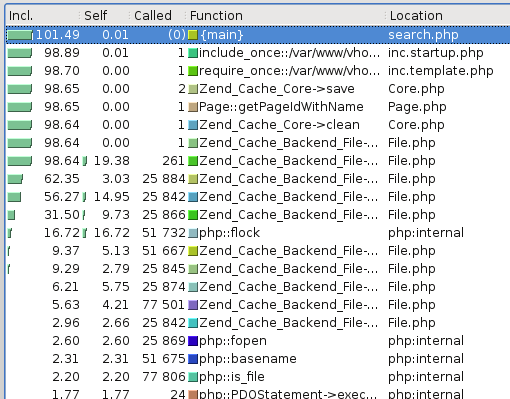
Some rummaging and profiling with xdebug showed that some requests looked like :

xdebug profiling output - note lots of zend_cache stuff

Note how there are 25,000 or so calls for various Zend_Cache_Backend_File thingys (fetch meta data, load contents, flock etc etc).

This alternative rendering might make it more clear – especially when compared with the image afterwards :

zend cache dominating the call map

while a normal request should look more like :

a "normal" request - note Zend_Cache is not dominating

Zend_Cache has a ‘automatic_cleaning_mode’ frontend parameter – which is by default set to 10 (i.e. 10% of all write requests to the cache result in it checking if there is anything to garbage collect/clean). Since we’re nearly always writing something to the cache, this results in 10% of requests triggering the cleaning logic.

See http://framework.zend.com/manual/en/zend.cache.frontends.html.


The cleaning is now run via a cron job something like :

$cache_instance->clean(Zend_Cache::CLEANING_MODE_OLD);


Delaying external javascript/content loading on a website…

One customer of ours, has a considerable amount of content which is loaded from third parties (generally adverts and tracking code). To the extent that it takes some time for page(s) to load on their website. On the website itself, there’s normally just a call to a single external JS file – which once included includes a lot of additional stuff (flash players, videos, adverts, tracking code etc etc).

On Tuesday night, I was playing catchup with the PHPClasses podcast, and heard about their ‘unusual’ optimisations – which involved using a loader class to pull in JS etc after the page had loaded. So, off I went to phpclasses.org, and found contentLoader.js (See it’s page – here).

Implementation is relatively easy, to the extent of adding the loader into the top of the document and “rewriting” any existing script tags/content so they’re loaded through the contentLoader.

<script src="/wp-content/themes/xxxx/scripts/contentLoader.js" type="text/javascript"></script>
<script type="text/javascript">
var cl = new ML.content.contentLoader();
// uncomment, debug does nothing for me, but the delayedContent one does.
//cl.debug = true;
//cl.delayedContent = '<div><img src="/wp-content/themes/images/loading-image.gif" alt="" width="24" height="24" /></div>';
</script>

And then adding something like the following at the bottom of the page :

<script type="text/javascript">
cl.loadContent();
</script>

And, then around any Javascript you want to delay loading until after the page is ready, use :

<script>
cl.addContent({
		    content: '' +'' + '<' + 'script type="text/javascript"' + ' src="http://remote.js/blah/blah.js" />' ,
		    inline: true,
		    priority: 50
		});
</script>

You can control the priority of the loading – lower numbers seem to be loaded first. You can also specify a height:/width: within the addContent – but I’m not sure these work.

For all I know there may be many other similar/better mechanisms to achieve the same – I’m pretty ignorant/clueless when it comes to Javascript. It’s a bit difficult for me to test it – as I have a fairly quick net connection – however it seems to move content around when looking at the net connections from FireBug, so I think it’s working as expected.
Checking varnish configuration syntax

If you’ve updated your varnish server’s configuration, there doesn’t seem to be an equivalent of ‘apachectl configtest’ for it, but you can do :

varnishd -C -f /etc/varnish/default.vcl

If everything is correct, varnish will then dump out the generated configuration. Otherwise you’ll get an error message pointing you to a specific line number.

Running along….

I think I’m back into my running ‘habit’ again, after finally overcoming an achilles tendon and so on.

I randomly installed RunKeeper on my iPhone, and I seem to be running at about 4minutes 30seconds per kilometer (I did 9.6km at this pace). The furthest I’ve been recently is about 13-14 miles, I think…

So, upcoming events:

I had intended to do the Sherwood Marathon last year, but then I injured myself… so hopefully this year will work out better.

PostgreSQL Backup script (python)

Perhaps the following will be of use to others. In a nutshell, it’s a python script which backs up a provided list of PostgreSQL databases. I’ve written it for Windows, but it should work on Linux too (just change the paths in the BACKUP_DIR and dumper variables. No doubt it could be changed to query PostgreSQL for a list of databases, and dump these individually (like the MySQL python dumping script I wrote some time ago), but for now… let’s just stick with something simple.

#!python

from time import gmtime, strftime
import subprocess
import os
import glob
import time

# change these as appropriate for your platform/environment :
USER = "postgres"
PASS = "postgres"
HOST = "localhost"

BACKUP_DIR = "e:\\postgresql_backups\\"
dumper = """ "c:\\program files\\postgresql\\8.1\\bin\\pg_dump" -U %s -Z 9 -f %s -F c %s  """                   

def log(string):
    print time.strftime("%Y-%m-%d-%H-%M-%S", time.gmtime()) + ": " + str(string)

# Change the value in brackets to keep more/fewer files. time.time() returns seconds since 1970...
# currently set to 2 days ago from when this script starts to run.

x_days_ago = time.time() - ( 60 * 60 * 24 * 2 )

os.putenv('PGPASSWORD', PASS)

database_list = subprocess.Popen('echo "select datname from pg_database" | psql -t -U %s -h %s template1' % (USER,HOST) , shell=True, stdout=subprocess.PIPE).stdout.readlines()

# Delete old backup files first.
for database_name in database_list :
    database_name = database_name.strip()
    if database_name == '':
        continue

    glob_list = glob.glob(BACKUP_DIR + database_name + '*' + '.pgdump')
    for file in glob_list:
        file_info = os.stat(file)
        if file_info.st_ctime < x_days_ago:
            log("Unlink: %s" % file)
            os.unlink(file)
        else:
            log("Keeping : %s" % file)

log("Backup files older than %s deleted." % time.strftime('%c', time.gmtime(x_days_ago)))

# Now perform the backup.
for database_name in database_list :
    log("dump started for %s" % database_name)
    thetime = str(strftime("%Y-%m-%d-%H-%M")) 
    file_name = database_name + '_' + thetime + ".sql.pgdump"
    #Run the pg_dump command to the right directory
    command = dumper % (USER,  BACKUP_DIR + file_name, database_name)
    log(command)
    subprocess.call(command,shell = True)
    log("%s dump finished" % database_name)

log("Backup job complete.")

That’s all folks.