From using MySQL, I’ve used the ‘unbuffered queries‘ feature a number of times. It’s where you don’t fetch the entire resultset into memory at once – which is necessary if you’re retrieving more data than you have memory available. If’s often also generally gets results/data back to you sooner.
Continue reading “PostgreSQL unbuffered queries and PHP (cursors)”
WordPress comment spam post fail
While trying to block spam posts on a forum, I noticed this gem.
No doubt someone’s spam sending program has failed, just a little….
Fixing REMOTE_ADDR when behind a proxy/varnish server
I had an annoyance where varnish proxy infront of a LAMP server and the LAMP server therefore thought all clients were from the varnish proxy – rather than the client’s real IP address – i.e. $_SERVER[‘REMOTE_ADDR’] was set to the IP address of the Varnish proxy and not that of the client’s actual IP address.
Obviously, Varnish adds the X_HTTP_FORWARDED_FOR HTTP header in when a connection comes through it; so my initial thought was to just overwrite PHP’s $_SERVER[‘REMOTE_ADDR’] setting. A bit of a hack and annoying – as I’d need to fix all sites, or have some sort of global prepend file (which is horrible).
I then discovered something which sorts the problem out – RPAF
- apt-get install libapache2-mod-rpaf
- Edit /etc/apache2/mods-enabled/rpaf.conf and ensure your proxy server’s IP address is listed on the RPAFproxy_ips line (e.g. RPAFproxy_ips 127.0.0.1 89.16.176.x).
- Restart Apache, and you’ll then find that the $_SERVER[‘REMOTE_ADDR’] value will be correct.
Checking PHP code for compatibility issues
One project I occassionally hack on is Xerte Toolkits.
Yesterday on the mailing list it came up that someone was trying to use XOT with PHP4.
After getting over some initial shock that people still use PHP4 (it was end-of-lifed in August 2008) I wondered how easy it would be to check the status of a code base to find how incompatible with PHP4 it now is.
My initial thought was to find a list of functions which had been added with PHP5 and then just grep the code for them, but it turns out there is a much nicer approach – PHP_CompatInfo
Installation was fairly straight forward – like :
pear channel-discover bartlett.laurent-laville.org
pear install bartlett/PHP_CompatInfo
Annoyingly the documentation seemed well hidden – but once I found it (http://php5.laurent-laville.org/compatinfo/manual/2.3/en/index.html#_documentation) it was pretty easy to use, and the ‘phpci’ command did all I needed –
Examples :
1. List global variables in use :
$ phpci print --reference PHP5 --report global -R .
436 / 436 [+++++++++++++++++++++++++++++++++++++++++++++++++++++++++>] 100.00%
BASE: /home/david/src/XOT/trunk

-------------------------------------------------------------------------------
PHP COMPAT INFO GLOBAL SUMMARY
-------------------------------------------------------------------------------
  GLOBAL                                                  VERSION         COUNT
-------------------------------------------------------------------------------
                                        $_GET             4.1.0               1
  data                                  $_GET             4.1.0               2
  debug                                 $_GET             4.1.0               2
  export                                $_GET             4.1.0               2
  file                                  $_GET             4.1.0               1
  firstname                             $_GET             4.1.0               1
....
2. Find all PHP5 functions in use :
$ phpci print  --report function -R . | grep 5.
436 / 436 [+++++++++++++++++++++++++++++++++++++++++++++++++++++++++>] 100.00%
  spl_autoload_register                 SPL               5.1.2               1
  simplexml_load_file                   SimpleXML         5.0.0               1
  iconv_set_encoding                    iconv             4.0.5               1
  iconv_strlen                          iconv             5.0.0              10
  iconv_strpos                          iconv             5.0.0              38
  iconv_strrpos                         iconv             5.0.0               3
  iconv_substr                          iconv             5.0.0              33
  dirname                               standard          4.0.0              53
  fclose                                standard          4.0.0              51
  file_put_contents                     standard          5.0.0               6
  fopen                                 standard          4.0.0              55
  fread                                 standard          4.0.0              57
  fwrite                                standard          4.0.0              50
  htmlentities                          standard          5.2.3               1
  md5                                   standard          4.0.0               1
  scandir                               standard          5.0.0               1
  str_split                             standard          5.0.0               3
REQUIRED PHP 5.2.3 (MIN)
Time: 0 seconds, Memory: 28.25Mb
and finally,
3. Class usage :
$ phpci print  --report class -R . | grep 5.
436 / 436 [+++++++++++++++++++++++++++++++++++++++++++++++++++++++++>] 100.00%
  Exception                             SPL               5.1.0               1
  InvalidArgumentException              SPL               5.1.0               2
REQUIRED PHP 5.1.0 (MIN)
4. All class usage :
i.e. without me grep’ping the results.
$ phpci print  --report class -R .
436 / 436 [+++++++++++++++++++++++++++++++++++++++++++++++++++++++++>] 100.00%
BASE: /home/david/src/XOT/trunk

-------------------------------------------------------------------------------
PHP COMPAT INFO CLASS SUMMARY
-------------------------------------------------------------------------------
  CLASS                                 EXTENSION         VERSION         COUNT
-------------------------------------------------------------------------------
  Exception                             SPL               5.1.0               1
  InvalidArgumentException              SPL               5.1.0               2
  PHP_CompatInfo                                          4.0.0               1
  Snoopy                                                  4.0.0               2
  StdClass                                                4.0.0               2
  Xerte_Authentication_Abstract                           4.0.0               6
  Xerte_Authentication_Factory                            4.0.0               4
  Xerte_Authentication_Guest                              4.0.0               1
  Xerte_Authentication_Ldap                               4.0.0               1
  Xerte_Authentication_Moodle                             4.0.0               1
  Xerte_Authentication_Static                             4.0.0               1
  Xerte_Authetication_Db                                  4.0.0               1
  Zend_Exception                                          4.0.0               2
  Zend_Locale                                             4.0.0               7
  Zend_Locale_Data                                        4.0.0              19
  Zend_Locale_Data_Translation                            4.0.0               6
  Zend_Locale_Exception                                   4.0.0              28
  Zend_Locale_Format                                      4.0.0               3
  Zend_Locale_Math                                        4.0.0              14
  Zend_Locale_Math_Exception                              4.0.0               9
  Zend_Locale_Math_PhpMath                                4.0.0              11
  archive                                                 4.0.0               3
  bzip_file                                               4.0.0               1
  dUnzip2                                                 4.0.0               3
  gzip_file                                               4.0.0               1
  tar_file                                                4.0.0               3
  toolkits_session_handler                                4.0.0               1
  zip_file                                                4.0.0               2
-------------------------------------------------------------------------------
A TOTAL OF 28 CLASS(S) WERE FOUND
REQUIRED PHP 5.1.0 (MIN)
-------------------------------------------------------------------------------
Time: 0 seconds, Memory: 27.50Mb
-------------------------------------------------------------------------------
Which answers my question(s) and so on.
Netbeans vs Vim … round 1 … fight
So, I think I’ve changed ‘editor’. Perhaps this is a bit like an engineer changing their calculator or something.
For the last 10 years, I’ve effectively only used ‘vim‘ for development of any PHP code I work on.
I felt I was best served using something like vim – where the interface was uncluttered, everything was a keypress away and I could literally fill my entire monitor with code. This was great if my day consisted of writing new code.
Unfortunately, this has rarely been the case for the last few years. I’ve increasingly found myself dipping in and out of projects – or needing to navigate through a complex set of dependencies to find methods/definitions/functions – thanks to the likes of PSR0. Suffice to say, Vim doesn’t really help me do this.
Perhaps, I’ve finally learnt that ‘raw’ typing speed is not the only measure of productivity – navigation through the codebase, viewing inline documentation or having a debugger at my fingertips is also important.
So, last week, while working on one project, I eventually got fed up of juggling between terminals and fighting with tab completion that I re-installed netbeans – so, while I’m sure vim can probably do anything netbeans can – if you have the right plugin installed and super flexible fingers.
So, what have I gained/lost :
- a 10 second slow down – that’s how long it takes to start Netbeans – even with an SSD and a desktop that should be quick enough (perhaps this is justification for a faster desktop?). Lesson learnt – do not close Netbeans.
- indexing of the code – although this takes some time when importing an existing project – it does make it very quick to ‘find uses’ of function/class X
- the ability to easily jump to a function/class definition (right click, find uses …)
- a list of ‘todo’ items – from my code comments … this has led to me removing some old legacy cruft…
- the ‘refactor’ functionality – i.e. rename function old_name() and change all instances of it to new_name()
- code indentation seems to work better under netbeans
- inline ‘warnings’ (i.e. unused variable, previously undefined variable[x], syntax errors etc) – so I don’t have to wait for them to appear in a browser or elsewhere.
- inline documentation etc while typing (i.e. type in in_array( and it reminds me where the needle and haystack are)
- with the right them, a nicer editor Window (mine is based on BrandonDark)
x – Fails with global variables on legacy projects though – in that netbeans doesn’t realise the variable has been sucked in through a earlier ‘require’ call.
I did briefly look at sublime a few weeks ago, but couldn’t see what the fuss was about – it didn’t seem to do very much – apart from have multiple tabs open for the various files I was editing.
A week of fire fighting (aka why you should <3 unit tests).
I feel like I’ve spent most of this week debugging some PHP code, and writing unit tests for it. Thankfully I think this firefighting exercise is nearly over.
Perhaps the alarm bells should have been going off a bit more in my head when it was implied that the code was being written in a quick-and-dirty manner (“as long as it works….”) and the customer kept adding in additional requirements – to the extent it is no longer clear where the end of the project is.
“It’s really simple – you just need to get a price back from two APIs”
then they added in :
“Some customers need to see the cheapest, some should only see some specific providers …”
and then :
“We want a global markup to be applied to all quotes”
and then :
“We also want a per customer markup”
and so on….
And the customer didn’t provide us with any verified test data (i.e. for a quote consisting of X it should cost A+B+C+D=Y).
The end result is an application which talks to two remote APIs to retrieve quotes. Users are asked at least 6 questions per quote (so there are a significant number of variations).
Experience made me slightly paranoid about editing the code base – I was worried I’d fix a bug in one pathway only to break another. On top of which, I initially didn’t really have any idea of whether it was broken or not – because I didn’t know what the correct (£) answers were.
Anyway, to start with, it was a bit like :
- Deploy through some weird copy+pasting manner due to Windows file permissions
- No unit test coverage
- No logging
- Apparently finished
- Apparently working (but the customer kept asking for more changes)
Now:
- Deployment through git; Stupid Windows file permissions fixed.
- Merged in changes by third party graphics designer – should be much easier to track any changes he makes in the future
- ~80% test code coverage. I’ve had to modify the ‘real’ scripts to accept a new parameter, which would make them read a local XML file (rather than the remote API/service) – in order for the tests to be reproducible (and quick to run)
- Logging in place, so there’s some traceability
- Better error handing
- Calculations manually checked and confirmed.
Interesting things I didn’t like about the code :
- Premature attempt at dependency injection – the few functions there are/were have a $db variable being passed in – but often don’t use it.
- There is significant duplication in the code base still.
- The code didn’t (and still doesn’t really) support testing particularly well – I’m having to retrieve output through a Zend_Http_Client call (i.e. mimicking a browser) – which means I can’t get code test coverage stats easily.
- In some places a variable was being set to 0 (e.g. $speed) which would be used to determine a special case (if $speed == 0). Having multiple meanings in/on the same variable makes it difficult to follow what’s going on – and is a pain when the customer requests it behaves a bit differently. Really a separate parameter should have been used.
SQL Injection with added magic_quotes assistance (the joys of legacy code maintenance)
Sometimes you really have to laugh (or shoot yourself) when you come across legacy code / the mess some other developer(s) left behind. (Names slightly changed to protect the innocent)
class RocketShip {

    function rahrah() {
        $sql = "insert into foo (rah,rahrah,...)
            values ( '" . $this->escape_str($this->meh) . "', ...... )";
        mysqli_query($this->db_link, $sql) or
            die("ERROR: " . mysqli_error($this->db_link));
        $this->id = mysqli_insert_id($this->db_link);
    }

    function escape_str($str)
    {
        if(get_magic_quotes_gpc())
           { $str = stripslashes($str);}
        //echo $str;
        //$clean = mysqli_real_escape_string($this->db_link,$str);
        //echo $clean;
       return $str;
    }
// ....
    function something_else() {
         mysqli_query($this->db_link,
            sprintf("insert into fish(field1,field2) values('%s', '%s')",
            $this->escape_str($this->field1),
            $this->escape_str($this->field2));

    }
}
You’ve got to just love the :
- Lack of Error handling / logging.
- Functionality of the escape_str function which is only making matters worse (and could never have worked due to the variable names)
- Use of sprintf and %s ….(obviously %d could be useful)
- Documentation?
Dare I uncomment the mysqi_real_escape_string and fix escape_str’s behaviour?
In other news, see this tweet – 84% of web apps are insecure; that’s a bit damning. But perhaps not surprising given code has a far longer lifespan than you expect….
Zend_Cache – automatic cache cleaning can be bad, mmkay?
$customer uses Zend_Cache in their codebase – and I noticed that every so often a page request would take ~5 seeconds (for no apparent reason), while normally they take < 1 second …
Some rummaging and profiling with xdebug showed that some requests looked like :
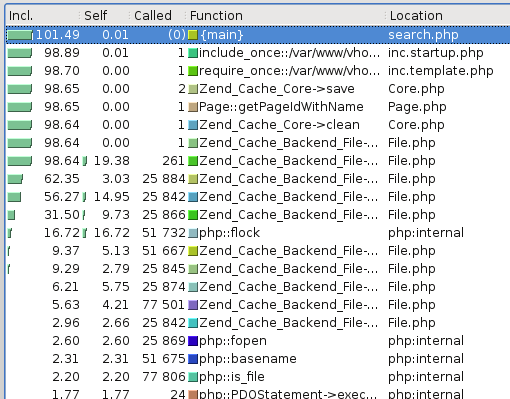
Note how there are 25,000 or so calls for various Zend_Cache_Backend_File thingys (fetch meta data, load contents, flock etc etc).
This alternative rendering might make it more clear – especially when compared with the image afterwards :

while a normal request should look more like :
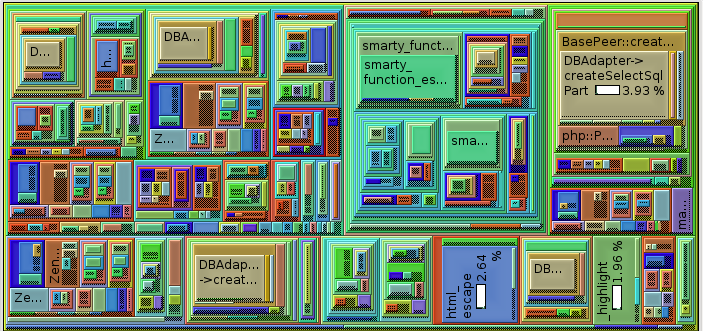
Zend_Cache has a ‘automatic_cleaning_mode’ frontend parameter – which is by default set to 10 (i.e. 10% of all write requests to the cache result in it checking if there is anything to garbage collect/clean). Since we’re nearly always writing something to the cache, this results in 10% of requests triggering the cleaning logic.
See http://framework.zend.com/manual/en/zend.cache.frontends.html.
The cleaning is now run via a cron job something like :
$cache_instance->clean(Zend_Cache::CLEANING_MODE_OLD);
PHP Serialization & igbinary
Recently I’ve been trying to cache more and more stuff – mostly to speed things up. All was well, while I was storing relatively small numbers of data – because (as you’ll see below) my approach was a little flawed.
Random background – I use Zend_Cache, in a sort of wrapped up local ‘Cache’ object, because I’m lazy. This uses Zend_Cache_Backend_File for storage of data, and makes sure e.g. different sites (dev/demo/live) have their own unique storage location – and also that nothing goes wrong if e.g. a maintenance script is run by a different user account.
My naive approach was to do e.g.
$cached_data = $cache->load('lots_of_stuff');
if(!empty($cached_data)) {
   if(isset($cached_data[$key])) {
       return $value;
   }
}
else {
    // calculate $value
    $cached_data[$key] = $value;
    $cache->save($cached_data, $cache_key);
}
return $value;
The big problem with this is that the $cached_data array tends to grow quite large; and PHP spends too long unserializing/serializing. The easy solution for that is to use more than one cache key. Problem mostly solved.
However, if the site is performing a few thousand calculations, speed of [de]serialisation is still gong to be an issue – even if the data involved is in small packets. I’d already profiled the code with xdebug/kcachegrind and could see PHP was spending a significant amount of time performing serialisation – and then remembered a presentation I’d seen (http://ilia.ws/files/zendcon_2010_hidden_features.pdf – see slides 14/15/16 I think) at PHPBarcelona covering Igbinary (https://github.com/phadej/igbinary)
Once you install the extension –
phpize
./configure
make
cp igbinary.so /usr/lib/somewhere
#add .ini file to /etc/php5/conf.d/
You’ll have access to igbinary_serialize() and igbinary_unserialize() (I think ‘make install’ failed for me, hence the manual cp etc).
I did a random performance test based on this and it seems to be somewhat quicker than other options (json_encode/serialize) – this was using PHP 5.3.5 on a 64bit platform. Each approach used the same data structure (a somewhat nested array); the important things to realise are that igbinary is quickest and uses less disk space.
JSON (json_encode/json_decode):
- JSON encoded in 2.18 seconds
- JSON decoded in 9.83 seconds
- serialized “String” size : 13993
Native PHP :
- PHP serialized in 2.91 seconds
- PHP unserialized in 6.43 seconds
- serialized “String” size : 20769
Igbinary :
- WIN igbinary serialized in 1.60 seconds
- WIN igbinrary unserialized in 4.77 seconds
- WIN serialized “String” Size : 4467
The performance testing bit is related to this Stackoverflow comment I made on what seemed a related post
Gregynog
Once a year, Aberystwyth’s Computer Science department take their second year students to Gregynog, for the purpose of preparing them for job interviews (mostly for the upcoming industrial year placements many students take between years 2 and 3). I’ve attended this for the last few years as an ‘Industrialist’ and help run mock interviews.
Initially when I first attended Gregynog as an Industrialist, it was because we [Pale Purple] were looking to hire an industrial placement student. For the last two years we haven’t, but it is still a very interesting weekend and I hope I’m able to provide something useful to the students and help them (besides it’s a free weekend away in quite nice settings 🙂 )
This year, was a bit different from previous years – namely we had much smaller groups of students (5 as opposed to around 10); and it was spread over two days (rather than one) so we effectively had a lot more time with each student.
Anyway, aside from a nice weekend away in Mid-Wales and a morning run through the countryside chasing pheasants, squirrels and rabbits for me…. what else did we learn?
Students are useless at selling themselves
It was quite common for students to not include relevant, useful information on their CVs – for example, one said something like “experience with Debian based distributions”, what we discovered he meant was “I’ve owned a multi-user VPS for the last few years, running Debian. It’s a web server which hosts subversion repositories for projects I’m involved in”…. great, so why didn’t you say you knew about Version Control and Linux Systems administration then? Skills which are highly desirable for a web developer. Others had experience of MySQL, or CISCO qualifications which weren’t mentioned. I’m sure there was far more.
We learnt that some (perhaps 15-20%) had experimented and undertaken extra-curricular study – but finding this out was hard. “So you’re interested in 3d graphics – have you done anything outside lectures on this?” “Err…. err… oh, yeah, I’ve…..”
Online Presence?
Logic would dictate that a student who has a strong interest in web development would have their own blog or some other form of online presence where they could experiment and so on. After all, if you have a passion in a subject area (as so many claimed in their covering letter) you would think they’d have dabbled in CSS (and heard of CSS Zen Garden), Javascript (jQuery) or loads of other stuff. One student mentioned jQuery.
Of the 40 students I interviewed, about 2 had a URL mentioned within their CV. Perhaps 4 used Twitter. (As evidenced by the lack of tweets using the #Gregynog hash tag perhaps?). Those who claimed an interest in photography hadn’t included a relevant flickr URL and so on.
If I advertise for a job, I will narrow down the initial pile of CVs to around 5 – of those, I’ll have tried to research each applicant online (Google, Twitter, Facebook, Uni web pages etc) – if I find anything bad I might change my selection, conversely if I find something good (e.g. a portfolio) I’m likely to favour them. The first interview involves me spending an hour or more with each student where I’ll ask them to undertake a short code test (fizz buzz, recursion and a random PHP code critique) and score each. Hopefully I’ll then get down to 2-3 who I’ll invite back to our office for a much longer interview (1/2 to 1 day). This isn’t possible for each student at Gregynog, but I do repeat the same process to the group as as whole.
Students overrate their abilities
“Advanced PHP” in student-esque means “I’ve done part of a small module on PHP, and I couldn’t write a simple program to add up a list of numbers”.
On the other hand there were students there who had written PHP in a commercial environment, and had relevant experience, yet said hardly anything about it. About 5 had mentioned experience of WordPress, yet we knew that they’d all installed and experimented with WordPress as part of a first year module.
“Comfortable with SQL” actually means “I can’t write a query like ‘select email from users where id = 2′”.
Students don’t follow the news
Of the students I interviewed, 2 or 3 knew about the #TwitterJokeTrial; Few knew about Oracle’s handling of Java, OpenOffice (and many others at lwn) or people’s worries over MySQL. Hardly any were involved in any form of user group (aside from one or two who had been to Fosdem).
Some didn’t know what they wanted to do
Some students were clearly not interested in either job (Java developer or a web dev). In these circumstances it was fairly obvious this was the case from seeing the CV and covering letter – so I could often only open with a “So, what do you want to do when you graduate?”, unfortunately this was often met with “err… I’m not sure”.
Students don’t seem to understand the recruitment process
It seemed lost on many students, that vacancies can get 10-30 or more applications. And a non-technical person may be screening the CVs before they get through to someone technical. For this reason, the CV needs to include buzz words and common acronyms which are easy to read and spot. It needs to be ordered along the lines of “Name, Statement, Skills, Relevant Experience, Education, Work experience, Referees”, and not contain a long list taking up half a page of all their module marks from the first year or two of University and also their A-levels and GCSEs. At most, I’d expect A-levels and GCSEs to have a line or two each.
Covering letter / CV – TL;DR.
A covering letter needs to be brief – clearly state which job they are applying for, and be easy to read (not more than one side of small print). Make sure your name is clearly on the covering letter and CV. Obvious stuff, you’d think.
Spelling Punctuation and Grammar
I can’t claim to be perfect, but few students had spell checked their CV. The age old suggestion of using beer as a carrot to get their friends to review/read their CV and give them feedback seemed to be well received. I can but hope. (Note, I’m not claiming to be perfect here – but I’m unlikely to write ‘badmington’ or ‘Solarus’ or ‘java’ or ‘i ‘).
Summary
As a general rule, the majority of the CVs were good – but they could have been so much better. We all seemed to be banging on over the weekend how so many of the students were good – yet totally useless at selling themselves.
One student really shone out to me – he was clueful about open source stuff, had contributed to open source projects and attended conferences and was able to critique ‘my’ PHP code – even though PHP wasn’t something he especially knew or was interested in (SQL Injection, non-existant error handling, no form validation, separation of concerns, no documentation, no captcha to stop automated form submission ….). I’ve no doubt he’ll do well in his degree.
That’s enough for now.